Everything You Need to Launch a Service Marketplace
Discover the complete feature set of our MyBuilder clone script. Compare customer, tasker, admin, payment, and mobile app features designed to help you build and grow a successful service marketplace.
Core Features of Our MyBuilder Clone Script
Our local services marketplace software comes with a range of features that enable you to build a successful task-based platform.
User Registration
Users can register on the platform as a tasker or a customer. They can create a profile providing essential information like the type of service they need or provide.
Job Posting
Customers can post jobs on the service platform. They can look for a service from any field including home repair, gardening, painting, electrical services and more.
Bidding
Taskers can send bids in response to tasks posted on the platform. While sending bids, they can mention their experience and price rate.
Assign Tasks
Customers can directly assign jobs to taskers on the platform. This process does not involve job posting and bidding.
Choose Tasker Based on Rating
When a customer receives multiple bids on a job, they can choose a professional based on ratings. They can choose a tasker who has the best ratings.
Escrow Payment System
The platform includes an Escrow system to hold payments until the successful completion of a task. It protects both customers and taskers on the service marketplace.
Multilingual and Multicurrency Support
Our ready-made service marketplace platform offers multilingual and multi-currency support, allowing users to communicate in their preferred language and make transactions in their preferred currency.
Real-Time Messaging and Notification
The software enables clients and taskers to communicate directly in real time through text messages. They also receive live notifications containing important updates.
Complete Features of Our MyBuilder Clone Script
Our MyBuilder clone script for businesses is equipped with a wide range of top-notch features. Select a role below.
Account & Profile
Customers can easily sign up by providing their email or phone number. A KYC verification ensures the profile is genuine. Users can manage their profiles and update name, address, photo, and other information.
Job Posting
Clients can post jobs by choosing a category or sub-category. They can describe the task with photos and videos, and mention the time by which they want their task completed.
Task Management
Clients can view the status of their tasks (active, pending, or in progress). They can edit or cancel a job before making an assignment, and accept or reject offers received from taskers.
Payment Gateways
After assigning a job to a tasker, clients can pay through Stripe or the built-in wallet. The payment is held safely in Escrow until the successful completion of the project.
Orders
If a customer comes across a tasker who offers a needed job, they can place an order and send the payment to Escrow. Once the tasker completes the job, they receive the payment.
Assign Tasks
Customers can directly assign jobs to taskers on the platform without posting jobs or receiving proposals. The client picks a tasker by browsing profiles and chooses based on skills.
Choosing Tasker Based on Rating
When a client posts a job, they receive multiple bids or proposals. They can pick a tasker by visiting their profile and checking ratings - choosing a professional with the best rating.
Review and Rating
Clients can rate taskers on multiple criteria after completion of a job - quality of work, communication, punctuality, and overall experience.
Registration / Profile Creation
Taskers can sign up on the platform providing phone number and email. A KYC verification verifies their authenticity. Documents required may include ID, license, or insurance information.
Tasker Dashboard
Through the tasker dashboard, taskers can view pending, ongoing, and completed jobs. They can also view earnings summary and withdrawal requests sent to clients.
Bidding
Taskers can post bids on the service platform. They can send bids/proposals to clients along with prices.
Execution of Task
Taskers can accept or reject offers received from clients. They can upload photos of a completed job and mark it as complete.
Schedule Calendar
Taskers can schedule slots when they are available for hire on a particular day. Customers can appoint them at slots that are most suitable for them.
Post Service
Our ready-made MyBuilder clone script includes a feature through which taskers can offer services at a particular price covering a specific period. If the client has any issue within this period, the tasker offers service without extra charges.
Notifications
When a tasker receives an order from a client on the task-based marketplace, they receive a notification directly on the platform or through email.
Switch Profiles
Our feature-rich service marketplace script enables taskers to switch their role and use the platform as a client - hiring services instead of offering.
Admin Dashboard
Through the customizable admin dashboard, admin can view overall statistics of the platform - total users, total jobs, and revenue amount generated by the platform.
User Management
The admin can manage both clients and taskers. They can approve and reject applications from new taskers, and manage the KYC verification process.
Transaction Management
The admin manages all kinds of transactions on the platform, refunds payable to customers, and adjustments to wallets.
Plan Management
The admin can offer different types of subscription plans to platform users. Through these plans, users can get access to premium features.
Dispute Resolution
Our advanced service marketplace script integrates an effective dispute management feature. Both clients and taskers can send dispute requests to the admin, who can resolve them through a built-in system.
CMS and SEO Management
The admin manages all platform content including About, Terms and Conditions, Privacy, Blogs, and more. They also manage SEO essentials - meta titles, tags, keywords, and descriptions.
MyBuilder Clone Platform with a Functional Mobile App
Our MyBuilder Clone script comes with a functional and feature-rich mobile app planned for launch. Through this service-based marketplace app, professionals can offer freelance tasks and clients can hire experts at affordable rates. The app has all the features and functionalities included in the website script.
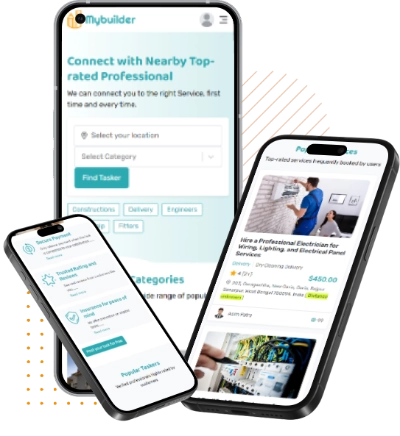
Build a Functional Mobile App for Your Task-Based Marketplace
See how the MyBuilder clone script gives you everything you need to build, manage, and grow a successful MyBuilder app or website. Book a demo now and get early access to the mobile apps the moment they're ready.
- Same features as the web platform
- Push notifications & in-app chat
- Location services for nearby taskers
- Free upgrade for existing license holders
See These Features Live
Try the MyBuilder live demo - explore every feature interactively, then book a call with our team.


